- My most used GitHub Copilot feature is tab completion. It's surprisingly effective for note-taking (which I do more than code-writing ever since coding agents arrived.)
Tabcompletes the suggestion andEsccancels it. I'm beginning to useAlt + ]andAlt + [to cycle through multiple suggestions. I'm amazed that it can act as a:#code-agents#github#markdown#prompt-engineering- Calculator/convertor. E.g. "9 * 86400 =", "5 miles in km is" or "3 days ago, i.e. on"
- Referrer. E.g. "The Attention Is All You Need paper at https://" or "The Pulitzer winning book Ants by"
- Educator. E.g. "The top 3 causes of cancer are"
- Ideator. E.g. "5 wild ideas for sneakily improving productivity are"
- You can open AI chatbots with a pre-populated query using these URLs. Gemini, notably, does not yet support this.
#chatgpt#code-agents- ChatGPT: https://chatgpt.com/?q=%s
- Claude: https://claude.ai/new?q=%s
- Google AI Mode: https://www.google.com/search?udm=50&q=%s
- Grok: https://grok.com/?q=hi
- Mistral: https://chat.mistral.ai/chat?q=%s
- Perplexity: https://www.perplexity.ai/search?q=%s
- A clever trick to prevent voice models from speaking too quickly. Use a "stay silent" function call. Ref
#speech-to-text#tts#voice-cloning
- The Body Keeps the Score by Bessel van der Kolk argues that trauma is stored in the body, not just the mind. Claude
- Trauma recall shuts down Broca's area (speech). Trauma survivors literally struggle to talk about trauma.
- Our nervous system has a calm social engagement state, a fight-or-flight state, and a freeze or shutdown state. For trauma survivors, the nervous system gets stuck in fight-or-flight or shutdown. (Based on the contested Polyvagal Theory.)
- Childhood trauma leads to several major health problems - heart disease, autoimmune disorders, depression, addiction, ...
- Recalling traumatic memories while following a therapist's finger with your eyes (EMDR) works.
- Yoga is promising but unproven. Neurofeedback (altering brainwave patterns with EEG feedback) even less proven.
- Clearly, trauma is stored in the body, not just the mind. We might need to rethink therapy.
- The Extended Phenotype by Richard Dawkins argues that genes shape not just the organism but the environment too. Claude
- In The Selfish Gene, he proposed that organisms are "survival machines" for genes.
- In this book, he extends this idea to show how genes can influence the environment beyond the organism's body.
- The dam of the beaver, the brain of an ant infected by a parasite, gut bacteria, are examples.
- Critics argue that this may be tautological. It's hard to falsify. It's more a mental model than a theory.
- Also, there's critique (see below). The general view is that there's merit to both perspectives.
- Epigenetics: Dawkins argues that only genes are inherited. But some RNA, proteins, and epigenetic markers are also be inherited.
- Developmental plasticity: Dawkins downplays the role of environment in shaping phenotypes.
- Multi-level selection: Gould argues that selection happens the organism and group levels too.
- Niche construction: Dawkins says genes modify the environment. But environments modify genes too.
- The Structure of Evolutionary Theory by Stephen Jay Gould expands on Darwinism, suggesting there's more than only natural selection. Claude
- Darwinism proposed continuous, smooth evolution. Gould proposes punctuated equilibrium - stable periods interrupted by rapid change. Fossils support this.
- Darwinism proposed selection of individuals. Gould proposes hierarchical selection - genes, individuals, groups, species. This is debated but has merit.
- Darwinism proposed every feature has a reason. Gould suggests some are byproducts of other adaptations (spandrels). Not every trait is adaptive. This is generally accepted.
- Darwinism proposed that humans would evolve if we replayed history. Gould argues that it's chance. Current opinion is convergence, i.e. something like us would still likely evolve.
- (He probably didn't need to write such a long book over 20+ years for this. Also, it led to the Darwin Wars, mostly with Dawkins.)
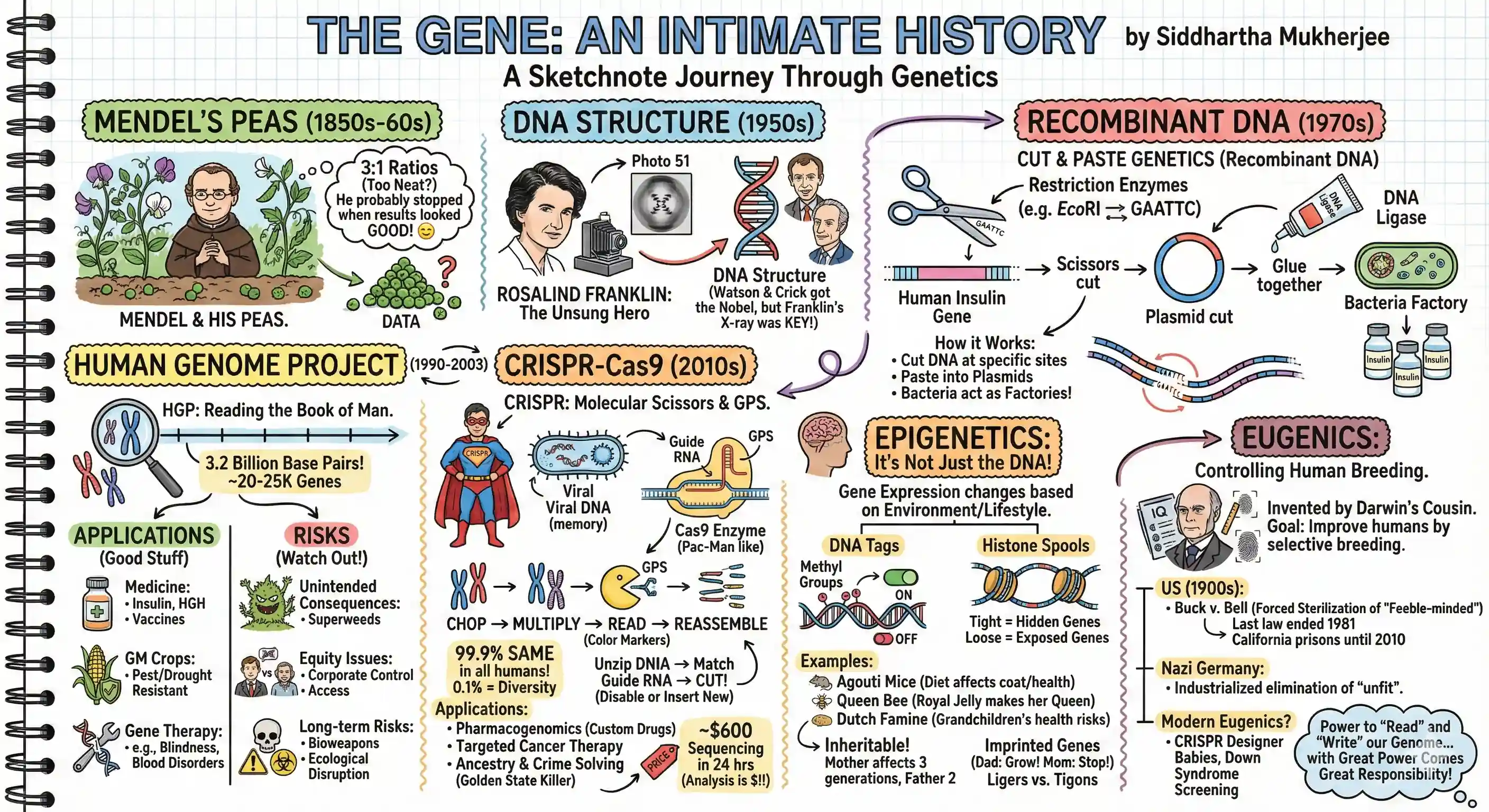
- The Gene: An Intimate History by Siddhartha Mukherjee explains the history of genetics. Claude
- Mendel's pea experiment numbers seem too neat. He probably didn't fudge it but stopped at good results.
- Rosalind Franklin's X-ray diffraction images were key to discovering DNA structure, but she didn't get enough credit.
- Recombinant DNA (1970s) lets us copy-paste genes between organisms. E.g.: we can find the DNA sequence for the insulin protein in humans, copy it into bacteria, and have bacteria produce insulin for us.
- How it works:
- Restriction enzymes cut DNA at specific sequences. E.g. EcoRI (from E. coli) cuts DNA at GAATTC. Many cut with one strand overhangs that stick to complementary sequences, making assembly easy.
- DNA ligase paste DNA strands together.
- Plasmids (circular DNA in bacteria) are vectors that carry foreign DNA into host cells. We can paste DNA to plasmids and introduce them into bacteria. Some viruses work similarly for animals / humans.
- This is useful for creating medicines, crops, and gene therapies.:
- Medicines: e.g. insulin, human growth hormone, clotting factors for hemophilia, vaccines (Hep B), erythropoietin (EPO) for anemia, cancer therapies, focused antibodies, etc.
- Agriculture for genetically modified (GM) foods: pest/drought-resistant crops, biofortified foods (Golden Rice with Vitamin A), nitrogen-fixing plants, etc.
- Gene therapy: replacing faulty genes to treat genetic disorders (inherited blindness, immune deficiencies, blood disorders, muscular dystrophy, etc.)
- This is risky because of the unintended consequences, equity, and long-term risks:
- Unintended consequences: Crop genes can spread. Herbicide-resistant weeds have emerged.
- Equity: Corporates control gene patents, concentrating power and limiting access. Only the rich can afford gene therapies.
- Long-term risks: Biological weapons, ecological disruption, new diseases, etc.
- How it works:
- The Human Genome Project (1990-2003) sequenced the entire human genome (3.2 billion base pairs). This helps identify disease genes, understand genetic variation, and develop personalized medicine.
- They chopped the DNA into small pieces, multiplied them using bacteria, paired them with colored markers to read them, and reassembled the full sequence using overlapping regions.
- We have 20-25K genes. 99.9% is the same between humans. The 0.1% accounts for ALL human diversity.
- A lot of the genome is not for protiens, but for regulation, i.e. when and where genes are expressed.
- This enables pharmacogenomics, i.e. custom drugs. Read a genome and predict which drugs will work best.
- Also targeted cancer therapies, i.e. read the tumor genome and design smart bomb drugs.
- Ancestry and crime solving. Find distant cousins, catch the Golden State Killer, etc.
- We can sequence our genome for ~$600 in 24 hours and it's falling. (Analysis is expensive.)
- CRISPR (2010s) lets you edit genes precisely. These "Clustered Regularly Interspaced Short Palindromic Repeats" are in bacteria.
- When bacteria survived a viral attack, they store a small piece of the enemy DNA in their own genome to recognize it.
- Cas9 is an enzyme that cuts DNA at a specific location suggested by Guide RNA. It unzips the DNA, matches the guide RNA to one strand, and cuts both strands.
- This disables the gene. Or, we can insert a new DNA sequence.
- This has been used to cure sickle cell anemia (which has a 'GTG' instead of 'GAG' in the hemoglobin gene, changing glutamic acid to valine) by editing bone marrow cells (not to fix this - that's hard - but to reactivate a fetal hemoglobin gene). This is FDA approved.
- Scientists are trying to edit the Asian Elephant to include woolly mammoth traits, make spicy tomatoes, etc.
- Risks: CRISPR might cut a SIMILAR but unintended gene. We can edit genes for better humans (like in Gattaca) and create edited species.
- Epigenetics is about how gene expression (not the DNA) changes based on environment and lifestyle.
- Epigenetics has 2 mechanisms. First, DNA has tags (methyl groups) that turn genes on/off without changing the sequence.
- Second, DNA is wrapped around protein "spools" (histones). Tight wrapping hides genes, loose wrapping exposes them.
- In the Agouti Study, mice fed methyl-rich diets had brown, healthy babies. Mice without it had yellow, obese babies prone to cancer.
- Queen bees are identical to worker bees genetically, but royal jelly changes their epigenome to make them queens.
- Grandchildren of the 1944 Dutch famine survivors have higher obesity, heart disease risk. Epigenetic changes are inheritable.
- Epigenetics inherits via sperm by (a) retaining ~1-10% of histones wrapped around important genes, and (b) small RNA molecules that regulate gene expression.
- Epigenetics inherits via eggs by (a) retaining several histones and (b) impact of the fluid environment in the womb. Also, mother eggs were developing when she was a fetus in grandmother's womb, so grandmother's environment matters too. Mother epigenetics affects 3 generations. Fathers affect only 2.
- There are ~100-200 imprintable genes that determine whether the dad's or the mom's gene is expressed. Growth is one example. E.g. dad IGF2 gene pushes for growth, while mom H19 gene limits growth to conserve resources. Lions have strong "grow/stop" genes. Tigers have weak ones. Ligers (Lion dad, Tiger mom) are huge. Tigons are small.
- Eugenics is about improving humans by controlling breeding.
- Invented by Francis Galton (Darwin's cousin) who founded psychometrics (IQ tests), fingerprinting, correlations, questionnaires, anthropometry (measuring humans), and a female attractiveness map of the UK (London >> Aberdeen).
- He suggested that the best humans breed, and the worst be prevented. The US and many countries adopted this (1900s). E.g. Buck v. Bell (1927) said forced sterilization of "feeble-minded" people was legal. Oliver Wendell Holms: "Three generations of imbeciles is enough." The last euginic law sterilization in the US was in 1981. California prisons sterilized females (2006-2010).
- Nazi Germany industrialized this. Deaf, blind, mentally ill, then eliminate gene pools.
- CRISPR and gene editing lets us design babies - another form of eugenics.
- Iceland and Denmark have eliminated Down syndrome births through screening and selective termination. It's a bit controversial.
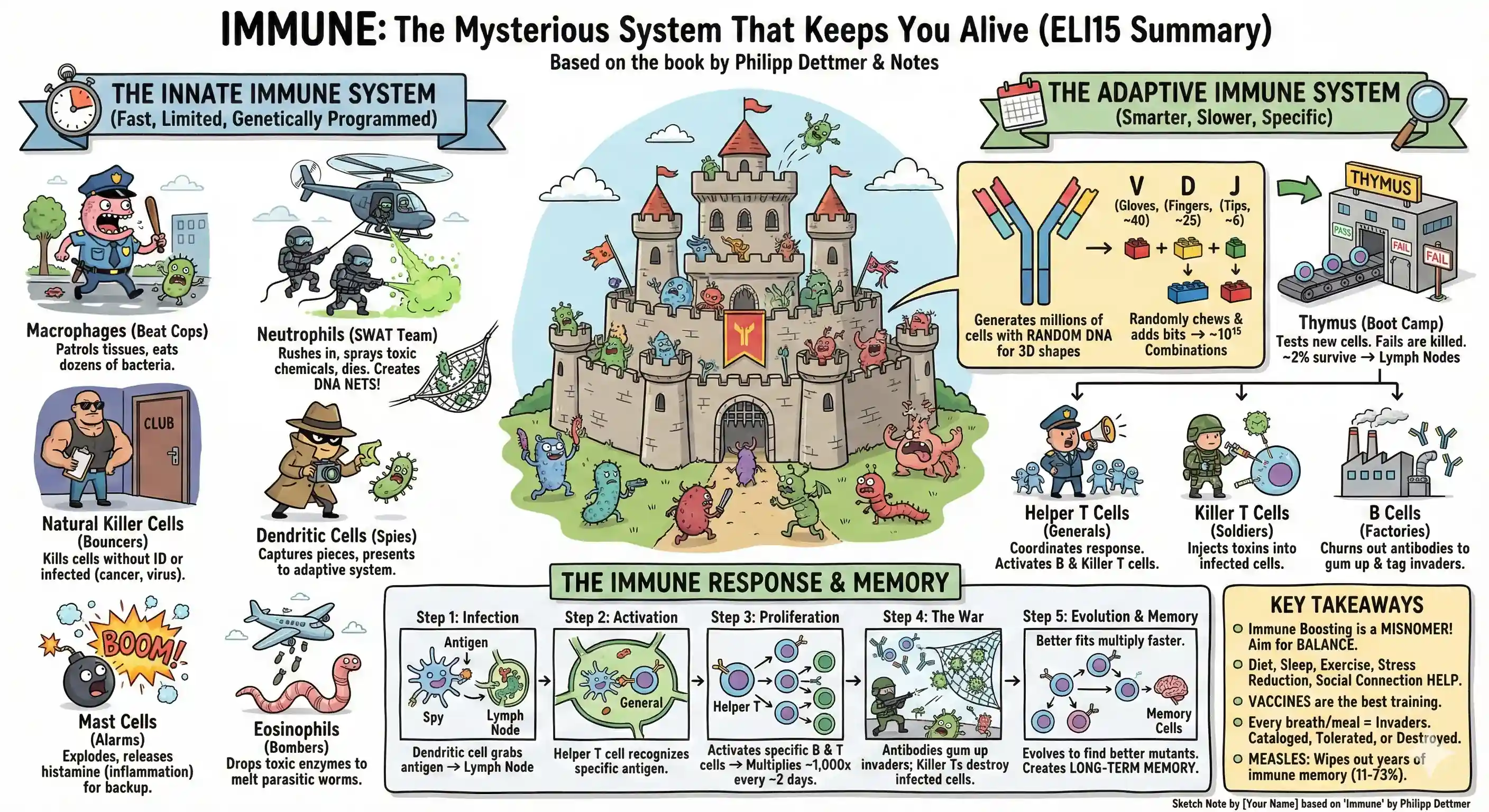
- Immune: A Journey Into the Mysterious System That Keeps You Alive by Philipp Dettmer explains the war our immune system wages daily. Claude
- Immunology is, as science writer Ed Yong memorably put it, "where intuition goes to die." It's the kind of subject that makes medical students weep and practicing physicians throw up their hands.
- We have an innate immune system. Genetically programmed for common pathogens. Fast, but limited. Like:
- Macrophages: beat cops that patrol tissues and eat dozens of bacteria before dying.
- Neutrophils: SWAT team that rush in, spray toxic chemicals (with collateral damage), and die. They rip out their own DNA to make nets that trap bacteria!
- Natural killer cells: bouncers that kill cells without an ID or have been infected (cancer, virus).
- Dendritic cells: spies that capture pieces of invaders and present them to the adaptive immune system.
- Mast cells: alarms that explode and release histimine (causing inflammation) to call for backup.
- Eoisinophils: bombers that drop toxic enzymes to melt parasitic worms too large to eat.
- The adaptive immune system is smarter and slower (days to weeks). It generates millions of cells with random DNA to create a 3D sheet with loops to grab specific antigens. It combines:
- ~40 Variable segments: "gloves" of ~95 amino acids to grab antigens. Like a 4x4 lego brick.
- ~25 Diversity segments: "fingers" of ~15 amino acits for the glove to grab better. Like a 1x2 lego piece.
- ~6 Joining segments: "tips" of 3-5 amino acids to connect glove to arm. Like a 1x1 stud.
- It randomly chews off a a bit from the ends and adds a few random bits to create ~10^15 potential combinations.
- When a new cell is born, the Thymus (near the upper chest) tests if it can attach to invaders and whether it's peaceful to body cells. Failing cells are killed. ~2% survive and go to the lymph nodes.
- These can be:
- Helper T cells: generals that coordinate the immune response by activating B cells, killer T cells, and macrophages.
- Killer T cells: soldiers that inject toxins into infected cells to kill them.
- B cells: factories that churn out antibodies that stick to invaders, gum them up, and tag them for destruction.
- When we get sick, the dendritic cell grabs an antigen (piece of an invader), sends it to the nearest lymph node, and if a Helper T cell recognizes it, it activates the B cells and Killer T cells specific to that invader. This can take days, and multiplies ~1,000x every ~2 days.
- Also, the B cells divide with intentional mutations and evolve to find mutants that catch invaders better. Better fits multiply faster.
- "Immune boosting" is a misnomer. We really want balance, and diet, fruit, vitamins, antioxidants, probiotics, sleep, exercise, stress reduction, social connection, etc. help. But vaccines are the best way to train the immune system.
- Every breath and meal draws in invaders. They're catalogued and tolerated or destroyed. It's incredible!
- Measles reduces immune memory 11-73%, wiping out years of immunity to other diseases. So, when I had measles in 2009 after my splenectomy in 2004, I had a double whammy. Damn! Didn't know that.
- Some books, like The Choice, aren't meant to be summarized. I can't even summarize the summary.
- The Origin of Consciousness in the Breakdown of the Bicameral Mind by Julian Jaynes proposes that introspective consciousness emerged ~3,000 years ago. Unproven but unfalsified. Claude
- He theorizes that until ~3,000 years ago, the right part of the brain generated "voices" the left part obeyed. The Iliad heard voices. The Odyssey has a self-aware hero.
- That's why ancients across cultures heard gods' voices. Idols were meant to trigger these voices. Kings literally spoke for the gods. People didn't feel responsible for their actions.
- With population growth, writing, and the Bronze Age collapse, humans were forced to adopt alternate cognitive strategies, leading to consciousness.
- That was also when philosophy, introspective religions, and new forms of literature emerged across the world. The Axial Age.
- Schizophrenia may be a vestige of this bicameral mind, where the right brain's "voices" are misinterpreted by the left brain. Hypnosis, oracles, and creative muses are other remnants.
- Neurological support is weak but literary/cultural analysis is strong. His theory hasn't been falsified.
- The Slight Edge by Jeff Olson suggests small, consistently repeated actions. Claude
- Small actions compound exponentially. But what's easy to do is also easy to skip.
- Quitters stop because it feels like small actions don't matter - leading to exponential decay.
- Willpower is overrated; time is underrated.
- What to do: Show up. Consistently. Even if no one's watching. Commit long-term. With optimism and purpose. Pay the price.
- Also: Happiness isn't just a result of success. It's often a cause. And habits also influence people around us.
- Why We Sleep by Matthew Walker elevates the importance of sleep - but also exaggerates. Claude
- Sleep has phases. In the first half, deep sleep (NREM) dominates. It consolidates memories. Then REM dominates. Dreams, connections, creativity, emotional regulation happen here. It resets brain and body health.
- Sleep deprivation worsens focus, memory, immunity, metabolism, heart health.
- Phones, caffeine (5-7 hours before), alcohol, early alarms, irregular schedules, late meals, warm bedrooms - all hurt sleep quality.
- But a lot of claims are exaggerated, unproven, or false. Sleep loss isn't a WHO epidemic. More sleep != longer life, it can shorten it (~7 hours seems optimal). Sleeping < 6-7 hours doesn't impact cancer. Modern societies don't sleep less than historically. Sleep deprivation helps depression. He also removed inconvenient data from a graph.
- BTW, anxiety about lack of sleep worsens sleep. So, chill.
- How Not To Die by Michael Greger suggests a plant-only diet, but evidence indicates otherwise. Claude
- Eat more plants, less processed food, cook meat at lower temperatures, and exercise. This much is valid.
- Unlike his claims, Omega-3s help heart disease. Milk reduces asthma risk. Soy doesn't seem to benefit non-Asians. Fish prevent dementia.
- He buries B12 deficiency risk. Overall, studies are cherry-picked and even contradicts his statements.
- Behave by Robert Sapolsky reasons our actions across seconds (neurological), hours (hormones, environment), months (neuroplasticity, learning), decades (genes, culture), millenia (evolution). Claude
- The Brain
- The amygdala detects uncertainty, not just fear/aggression. The unfamiliar triggers it. But the response diminishes with exposure. It can be modulated by the prefrontal cortex.
- The prefrontal cortex plans. It develops late and can override amygdala responses. It is impaired by stress, fatigue, alcohol, etc. It can plan genocide / retribution as well as peace.
- The Hormone
- Testosterone is an amplifier. It amplifies agression but also generosity! It lowers threshold for context-appropriate behaviour.
- Oxytocin promotes in-group trust, but promotes out-group hostility. It's the molecule of tribalism, not love.
- The Childhood
- Early stress triggers epigenetic changes that makes the amygdala hyperactive, impairs prefrontal cortex, and alters stress hormone regulation.
- This leads to impulsivity, aggression, anxiety, depression, addiction, etc.
- The Evolution
- We are naturally hierarchical and tribal.
- Thanks to language, we can expand / contract our tribes to include / exclude anyone (or anything) based on arbitrary stories.
- Let's approach wrongdoing with humility. Punishment and rewards CAN shape behavior. But a focus on prevention over retribution may help more.
- The Brain
- Price of the Modi Years by Aakar Patel suggests that most metrics worsened under Modi. True, but these also seem cherry-picked. Claude
- Announcements had more impact than executions.
- 99% of the 15.3 lakh crores demonetized came back to banks, laundered.
- Manufacturing GDP share fell from 16% to 13% after Make in India was launched. Employment fell from 5.1 to 2.7 cr.
- Press freedom rank fell from 140 (2014) to 151 - and is now 159.
- Democracy rank fell freom 27 (2014) to 41 (2021). India is classified as a "Flawed Democracy".
- Human Development Index is stagnant at 130.
- Global Hunger rank fell freom 55 / 76 (2014) to 102 / 123 (2024?).
- But:
- Economic Freedom rank rose from 112 (2014) to 84 (2023?).
- Digital payments, rural electrification, toilet construction, etc. aren't mentioned.
- Announcements had more impact than executions.
- The Ants by Bert Hölldobler, Edward O. Wilson is the only science textbook (!) to win a Pulitzer. Claude
- Ants are only ~20% of human biomass, not 100% as the book claims, but that's 2.5m ants per human!
- ⭐ Sterile ants, which are all female, help the queen reproduce instead of having their own kids.
- Ants, bees, wasps, etc. are haplodiploid, i.e. females have father + mother genes, males develop from unfertilized eggs (only mother genes).
- So, sisters share 75% of genes, more than 50% with their own kids. Helping mothers make sisters is better than having kids!
- (And if this isn't an alien civilization, what is? We don't need sci-fi. Nature is weirder than fiction.)
- But their math doesn't hold up!
- If the queen produces 50% brothers (with 25% common genes) and 50% sisters (75% common genes), the average is 50% common genes, same as having kids.
- But building a nest is hard, specialization is efficient, etc. So ants stay sterile and help the colony.
- BTW, this gene math only works if the queen is 100% monogamous - so they are, or at least, were, until evolution locked it in.
- (Making nature one-step less alien. But still weird.)
- Epigenetics determines caste. More food or specific food (e.g. royal jelly in bees) changes gene expression of the same DNA.
- When a queen dies, some ants (e.g. Indian jumping ants) can reprogram a worker ant into a queen through diet!
- Leafcutter ants have been "farming" for 50 million years. Rather, are part of an agricultural symbiosis.
- They cut leaves and feed it to a fungus they cultivate in their nests.
- They protect the fungus from pests using antibiotics produced by bacteria living on their bodies. They clear decay and weeds.
- They can't live without the fungus because it produces a nutrient (Arginine) that they need but can no longer make themselves.
- Ants communicate using pheromones, touch, and sound.
- Pheromones can communicate species, colony, caste, reproductive status, alarm, food trail, etc. These evaporate unless reinforced.
- They have a bigger, more advanced, brain region than other insects. It's not multiple brain parts coordinating.
- Using CRISPR to knock out pheromone receptors makes ants unable to communicate. Mutant ants wander aimlessly until killed by the colony.
- They tap each other with their antennae: to taste skin for identification, or to beg for regurgitated food.
- Some ants have a scraper on their waist that they rub against their abdomen. Triggers "emergency alarm", e.g. "I'm buried" or "Help me cut!"
- Pheromones can communicate species, colony, caste, reproductive status, alarm, food trail, etc. These evaporate unless reinforced.
- Ant colonies are superorganisms, i.e. agents that work together to produce emergent behavior. They have sterile castes. Only ants, bees, naked mole rats, ... qualify.
- The nest is like a giant lung. Passive ventilation sucks CO2 from top chimneys and brings in O2 from lower entrances. They regulate temperature by opening/closing nest entrances. They send workers out for water to evaporatively cool the nest.
- They circulate nutrients by vomiting food into each others mouths. (Ants have two stomachs - one for themselves, one for sharing.) Ants can't digest meat but larvae can, so they feed meat to larvae and share the digested food. Larvae act like a liver.
- They have an immune system. Sanitation squads carry dead ants far away. Fungally infected ants leave the nest and die alone. Infected pupae are killed by workers.
- They have a neural system. Memory is stored in pheromone trails.
- Ant politics exists. E.g. Workers destroy eggs laid by other workers, protect sister-laid eggs, etc.
- The Cancer Code by Jason Fung suggests that cancer might be about cells acting selfishly, triggered by body environment. Claude
- Metastatis is when cancer cells spread from the tumor to other body parts. It kills by eating up resources, mechanical obstruction, poisoning, triggering clots, or reducing immunity.
- We used to cut (surgery), burn (radiation), or poison (chemotherapy) cancer cells.
- Then we learnt cancer cells were mutations and targeted therapies work (expensively). But it treated <5% of cancers.
- Paul Davies (!) suggested cancer is when cells devolve to our unicellular ancestry. Cells that should die for collective good instead multiply. This theory is gaining ground but not proven.
- Devolution is enabled by the body environment. For example:
- Insulin resistance. Sugar matters less. It's the insulin resistance.
- Oxidative stress, i.e. not enough antioxidants to neutralize the free radicals. (Free radicals are molecules with 1 extra or missing electron. They damage cells. Mitochondria misfires and creates free radicals 0.2-2% of the time. Smoking, pollution, radiation, stress increase free radicals. Immune cells also create free radicals to kill cells.)
- Chronic inflammation. Leads to oxidative stress.
- Hormonal imbalances. E.g. high estrogen, testosterone.
- Immunotherapy (teaching the immune system to attack cancer cells) is promising.
- Weight loss might prevent / reverse cancer. Evidence is preliminary.
- The Diabetes Code by Jason Fung suggests less intake to reverse Type 2 Diabetes. Claude
- Insulin pushes sugar into cells for energy storage.
- In Type 1 Diabetes, immune cells attack insulin-producing cells. Patients need insulin to survive.
- In Type 2 Diabetes, high carbs -> high insulin -> cells become insulin-resistant. Feeding them insulin can harm, sometimes.
- Weight loss can definitely reverse it. Reducing carbs & preferring whole foods helps. Intermittent fasting likely helps.
- But "sugar is the main driver of Type 2 Diabetes" isn't research-robust. Genetics, sleep, stress, gut microbiome, socioeconomics contribute. Diet & fasting are hard to sustain, and isn't for everyone.
- The Obesity Code by Jason Fung suggests whole foods and intermittent fasting. Claude
- Eating whole foods (rather than processed foods) does help.
- Fasting does help. (But maybe no more than reduced calorie intake, and sustaining it could be harder.)
- But his claim that high insulin -> obesity isn't research-robust. It may be correlation not causation.
- ⭐ How Minds Change suggests that friendship, more than facts, changes opinions. Sometimes your own, too. Claude
#beliefs- Facts backfire (though less often than the book indicates). Challenging identity is a survival threat.
- Asking genuine questions and actually listening enables change. (It might change you, too.)
- "How did you come to believe that?" "How confident are you (1-10)?" "What would it take to move that number?" helps introspect.
- Relationships create safety to question beliefs. Lasting change requires somewhere new to belong.
- If you see a smooth, glassy patch surrounded by ripples, it’s usually because a thin surface film or local surface flow is damping the tiny wind-made waves there, not because the water underneath is calmer. ChatGPT

- Lifespan and The Telomere EFfect suggest exercise, sleep, eat well, manage stress to live longer. Claude
- Actually, they mainly suggest sirtuins, resveratrol, NMN, telomere-lengthening lifestyles, etc. to defeat aging. None of this is research-proven. The traditional advice is the only proven stuff.
- Outlive suggests exercise for living longer - and to make sure your life is worth extending! Claude
- Medicine focuses more on cure than prevention.
- Exercise has the highest impact on longevity. Especially zone 2 cardio and body strength (e.g. measure grip strength).
- apoB under 80mg/dL is a better indicator of heart risk than LDL.
- But make sure your life is worth living!
- Katy Milkman's How to Change suggests that biases are hard to change. Engineer environments and habits instead. Claude
- Breaking bad habits is hard. Start on a New Year, birthday, festivals, etc. for ease.
- Breaks in continuity erase good habits. Be flexible for continuity (e.g. 7/week is more flexible than 1/day is more flexible than once every morning).
- ⭐ Daniel Kahnemann's Noise suggests experts are more random than we think. Claude
#best-practices- When execs (or students) complain, "Oh, but the LLM aren't consistent!" -- nor are humans!
- Get multiple INDEPENDENT opinions
- Use CHECKLISTS to reduce variability
- Use ALGORITHMS to spot outliers
- Acknowledge luck, good or bad. Leverage serendipity
- Notes from awesome-npm #
npm run command --silentsuppresses npm output, only shows script output.npm startandnpm testare the conventions to run the app / server and test. Use these more.npx [email protected] -- node --versionlets you run any node version without nvm, etc.npm linkinstalls package in the current directory as a global. You can link to it from any other package vianpm link <dirname>.npm install owner/repoinstalls directly from GitHub.npm ls --depth=2shows dependency tree up to depth 2.
rclone mountover SFTP is the worst-case for thousands of tiny files. Everystat,readdir,unlinkis an extra network round-trips, taking ~1s per operation. I'm switching to rsync instead for my Hetzner storage box. #- Context: I set it up via:
rclone config create hetzner sftp host $USER.your-storagebox.de user $USER shell_type unix - ... and mounted it via
rclone mount hetzner:/ /mnt/hetzner --vfs-cache-mode full --vfs-cache-max-age 24h --vfs-cache-max-size 10G
- Context: I set it up via:
- The Molecule of More and Dopamine Nation recommend pain as a down-payment for sustained pleasure. Claude
- Dopamine drives wanting/dread, which is decoupled from like/dislike.
- It also does a bunch of other things like learning (maps actions to rewards), attention, etc.
- Low dopamine => focus, medium => creativity, high => noise.
- Brain runs a thermostat. Pleasure/pain trigger a delayed, long-decay counter-reward that we feel as "That's it?" or "Whew!". Abstention just resets it. Meditation just makes you aware.
- Pain-upfront leads to long-decay pleasure: learning/teaching, creative struggle, exercise, ice showers/sauna, fasting, spicy food, cleaning, tough conversations, apology, forgiveness, public speaking, dating, deep work, delayed gratification, investing, grief, sacrifice, boredom, etc.
- Surprises spike dopamine: low standards, variable rewards, interleaved work, artificial constraints, environment/social rotation, progressive difficulty, ...
- Dopamine mechanics are complex. Don't trust any theory just yet.
- ⭐ Pain is the down payment. Surprise is the interest. Recovery is the compounding period.
- Sex at Dawn claims humans evolved as promiscuous and non-jealous, that monogamy is recent. It's partly valid (sexuality is more flexible and context-dependent than monogamy / nuclear families) but is also over-simplified with cherry-picked evidence. Claude
- Discovered the
--extremeoption forxz, which compresses even better (but slower). For archives, I now usexz -9e -vv file. Single-threaded is slower but better for compression, so don't use-mt. For ultra-large files, add--lzma2=dict=256MiBor similar, keeping dictionary size smaller than RAM and file size. #
- You can specify a git repo as an inline script dependency directly in a
.pyfile when running withuv! ##github# /// script # dependencies = ["git+https://github.com/owner/repo.git"] # ///
- Excuses are a great way of making us feel better. They are synonyms for "reasons". They reduce guilt/anxiety, lower standards -- all of which could be considered bad -- but if we are aware of it and use it consciously, it can help us move forward. (Rare TIL from my own brain, not an LLM.)